Overview

Files indexing & Storage devices manager
Katalog is a file catalog manager that helps you organize and find files.
It gives a full view of the files across multiple storage devices without needing them connected.
Katalog creates indexes so you can search your entire file collection from one place, whether you manage internal and external drives, USB sticks, network storage, or discs (Blu-ray, DVD, CD).
- Catalog everything: create detailed indexes of the files of any storage device.
- Search offline: find files without connecting or mounting the original device.
- Organize the collection: manage storage devices and their catalogs in one hierarchy.
- Back up: copy or move the files missing from a backup, using the catalogs.
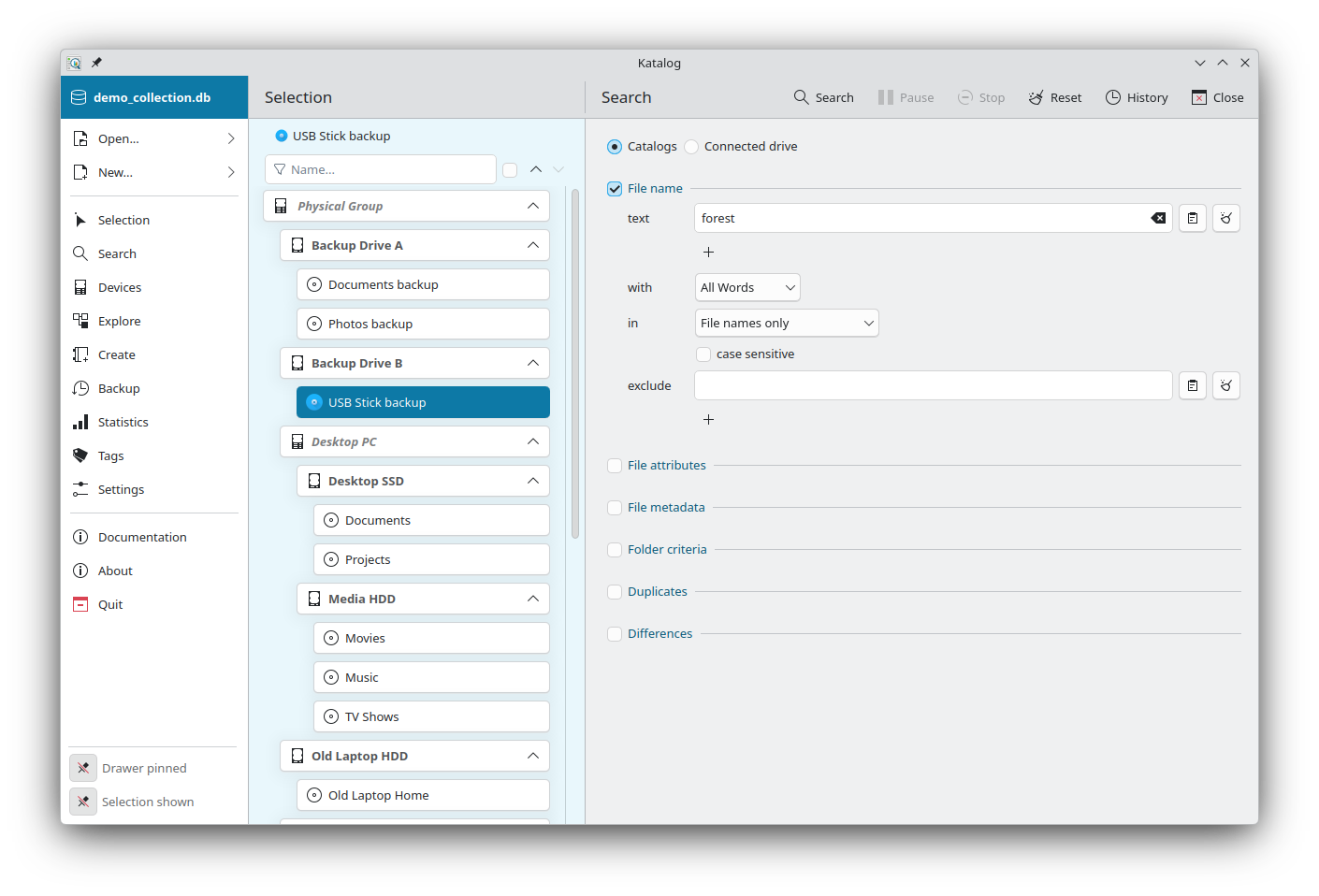
Pages
The window shows the Selection page on the left: the tree of all the devices of the collection. Selecting a device sets the scope of the other pages. Each feature opens as a page next to it, from the drawer (see Interface):
- Search files across all the storage devices, without needing them connected, and act on the results.
- Organize the Devices and their catalogs in one hierarchy, with virtual devices to group them, and edit them.
- Explore the folders and files of a catalog.
- Create catalogs of files.
- Copy or move files with Backup links, and check the coverage of the backups.
- Follow the growth of the collection in Statistics.
- Assign Tags to folders, for extra search possibilities.
- Set up the collection and the application in the Settings: data mode, import, theme, language.
Key features
Rich file information
- File type detection: the type of each file is found from its extension, for hundreds of formats.
- Catalog options: include only a type of files, sub-folders or not, hidden files, and exclude folders or files.
- Metadata extraction: dimensions of images and videos, duration of videos and audio files, artist and album of music, or any metadata of other file types.
- File checksum: SHA-256 checksums for exact duplicate and difference searches, and to verify files.
- Folder tags: organize and categorize folders with your own tags.
Search & discovery
- Search criteria: find files by name (several texts, exclusions, regular expressions), folder, size, date, file type and metadata.
- Find duplicates: identify duplicate files across devices.
- Find differences: see the differences between two devices, for example a folder and its backup.
- Actions on results: filter the results, export them, verify checksums, extract metadata, move to trash.
Devices & catalogs
- Device hierarchy: physical group, storage devices and catalogs, and virtual groups.
- Update: keep the catalogs current, one by one or all the available ones at once.
- Path changes: when a drive is mounted somewhere else, fix all its catalogs in seconds, without reading the drive.
- Collection import & update: import devices from another Katalog collection or from VVV, and refresh them later.
Analysis & management
- File explorer: browse the content of a catalog as if the device were connected, with the size of each folder.
- Statistics: track the growth of the collection and of the storage space.
- Backup & archive: copy or move files between catalogs, preview, run several links at once, and check the coverage.
- Data modes: keep the collection in a folder of files, in a SQLite database, or in a hosted database.
Katalog 2
Katalog 2 remains available, with its documentation, including the command line (Linux).
Multi-Platform Support
| Main OS | Distributions / Minimum Versions | Packaging |
|---|---|---|
 GNU/Linux GNU/Linux | 64bits, glibc 2.38+ 32bits, glibc 2.35 | FlatHub/Flatpak AppImage |
 Microsoft Windows Microsoft Windows | 64bits: Windows 10 & Windows 11 | Installer Portable |
 Apple macOS Apple macOS | 15 (Sequoia) | Installer Portable |
macOS Compatibility
- Minimum macOS version: macOS 15 (Sequoia) or later
- Tested on: macOS 15 (Sequoia), Apple Silicon
- Architecture: Apple Silicon (M1/M2/M3) only. Intel Macs are not supported — Rosetta 2 translates Intel software to run on Apple Silicon, not the other way round, so there is no way to run this build on an Intel Mac.
- Build environment: Built on macOS 15 (Sequoia) with Qt 6 and KDE Frameworks 6 (KF6), via Homebrew
Important: the app is not code-signed or notarized.
macOS will block the app by default. To run Katalog, try one of these methods:
- Right-click the app → select "Open" (not double-click) → confirm in the dialog
- Or go to System Settings → Privacy & Security → scroll down and click "Open Anyway"
- Or run in Terminal:
xattr -cr /path/to/Katalog.appthen open normally. Addsudoin front if permission is denied.
Known limitation:
on Macs managed by an organization (MDM/corporate profile), these workarounds may be blocked by security policy. There is currently no solution for managed Macs — this would require signing the app with an Apple Developer certificate.
A legacy build (v2.5, pure Qt6, no KF6 dependencies) is also available with the same macOS requirements.
Multi-Language Support
App languages
Katalog is available in:
| Locale | Language | Locale | Language | Locale | Language |
|---|---|---|---|---|---|
| bg_BG | Bulgarian | hi_IN | Hindi | pl_PL | Polish |
| cs_CZ | Czech | hr_HR | Croatian | pt_PT | Portuguese |
| da_DK | Danish | hu_HU | Hungarian | ro_RO | Romanian |
| de_DE | German | id_ID | Indonesian | si_SI | Slovenian |
| en_US | English | it_IT | Italian | sk_SK | Slovak |
| es_ES | Spanish | ja_JP | Japanese | sr_RS | Serbian |
| et_EE | Estonian | lt_LT | Lithuanian | sv_SE | Swedish |
| fi_FI | Finnish | lv_LV | Latvian | uk_UA | Ukrainian |
| fr_FR | French | nb_NO | Norwegian | zh_CN | Chinese |
| el_GR | Greek | nl_NL | Dutch |
Documentation languages
Documentation is available in:
| Locale | Language |
|---|---|
| en_US | English |
| cs_CZ | Czech |
| fr_FR | French |
Ready to organize your file collection? Start with the Tutorial to create your first catalog in under 5 minutes.