Devices

Summary
This page describes the Devices page, where the devices of the collection are listed and managed:
- the device model: catalogs, storage, virtual devices and groups,
- the views: all devices, storage or catalogs, as cards or as a table,
- the actions of the page: update all active catalogs, snapshot, new group or storage,
- the context menu of a device: update, explore, edit, checksums, split, assign, delete.
Editing a device (name, path, catalog options, storage details) is described on the Edit device page.
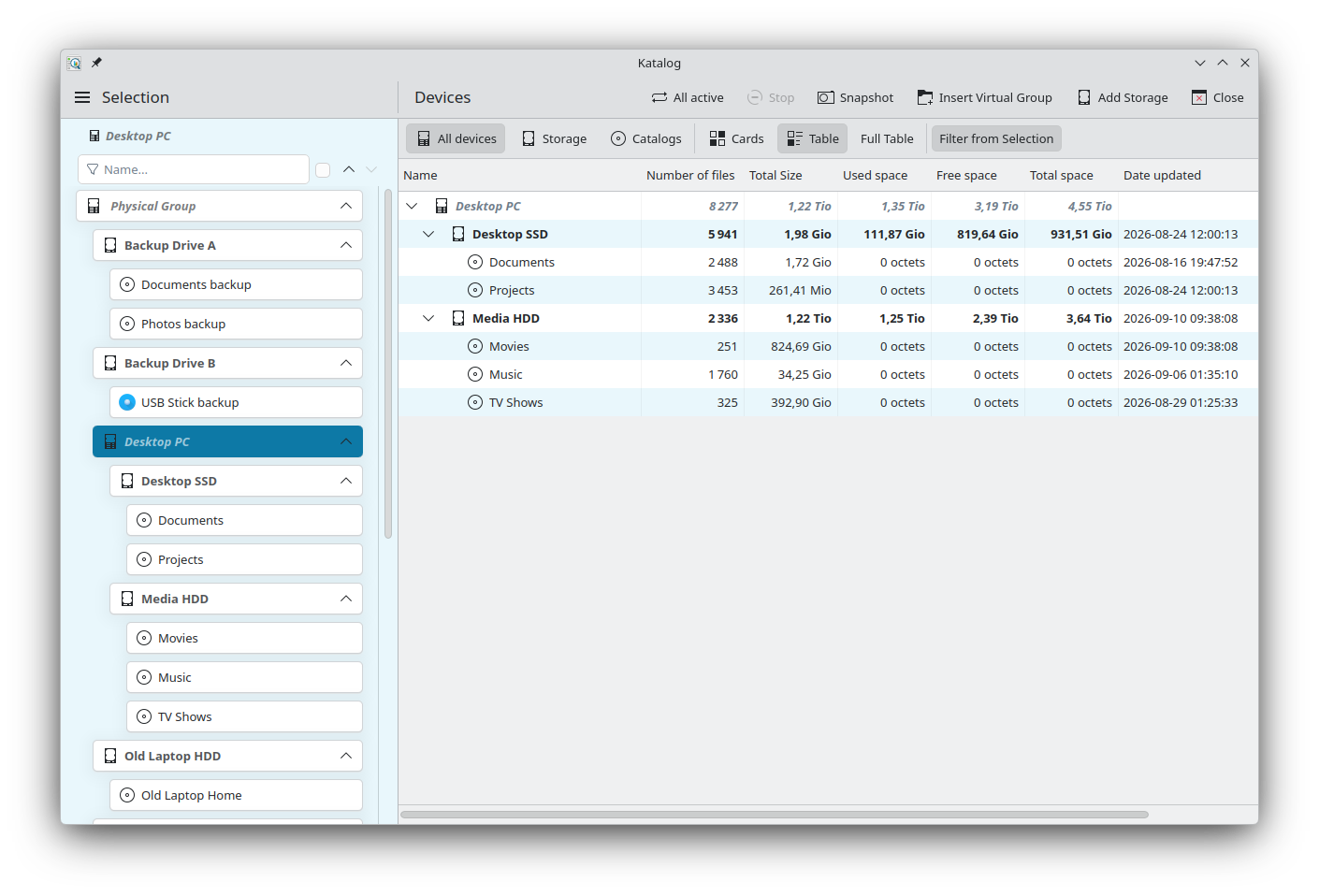
Device model
Definitions
- A Catalog is an index of the files of one directory: its source path. Catalogs are created on the Create page.
- A Storage device is a physical drive, disk or other medium where files are stored. It has a path where it is mounted, and physical space.
- A Virtual device groups other devices together. It has no data of its own, and adds up the figures of the devices below it.
- A Group is a virtual device at the top of the tree:
- the Physical Group is unique and reserved for the physical devices (computer, disk, phone…) and their catalogs,
- any other is a Virtual Group, to which existing catalogs are assigned, for example all the photo catalogs in a Photos group.
Any device can have a comment: a free note, shown next to its name.
Hierarchy
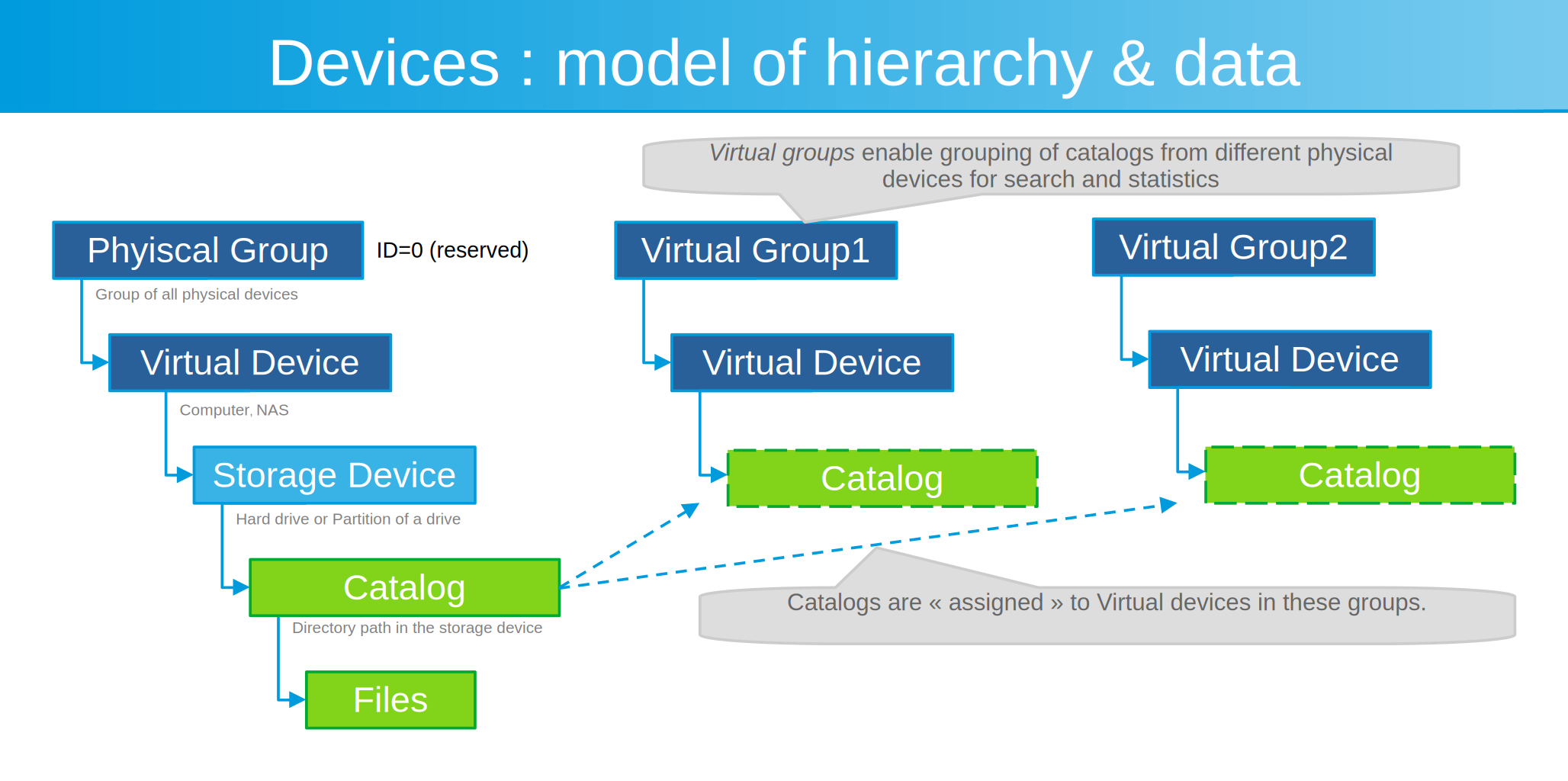
A catalog belongs to one storage, in the Physical Group. It can also be assigned to virtual devices of the Virtual Groups: this gives a way to search only in these catalogs, and to see their totals.
Available devices
A device is available when its path can be reached: the drive is connected and mounted. Its icon is shown in colour; an unavailable device has a grey icon.
Catalogs of unavailable devices can still be searched and explored; only the actions that read the drive (update, open, checksums…) need the device.
Views
The bar at the top of the page chooses what is listed and how.
| Button | Effect |
|---|---|
| All devices | The whole tree: Physical Group with its storage and catalogs, and the Virtual Groups with their assigned devices. |
| Storage | Storage devices only. |
| Catalogs | Catalogs only. |
| Cards | Each device is a card, with its name, comment, figures and a menu of actions. |
| Table | Each device is a row, with one column per value. |
| Full Table | In the table, shows all the columns, including internal IDs and the less used details. |
| Filter from Selection | Lists only the device selected on the Selection page and the devices below it. |
The choices are kept for each collection.
Totals
With Storage or Catalogs, a bar below the buttons gives the totals of the listed devices:
- Catalogs: number of catalogs, Total File Size, Total Number of Files,
- Storage: number of devices, Total Space, Used and Free space.
Cards
A card shows the device icon and name, its comment, and a line with its type, number of files and size, used, free and total space for storage, and the date of its last update.
In All devices, the cards are indented to show the tree, and the arrow on the right of a card folds or unfolds the devices below it.
The menu button on the right of a card, a right-click, or a press and hold opens the context menu.
Table
- Click a column title to sort by that column; click again to reverse the order. Numbers, sizes and dates sort by their value.
- Drag the line between two column titles to change a column width; double-click it to fit the column to its content. The widths of Name and Path are kept, separately for each view.
- In All devices, the arrow before a name folds or unfolds the devices below it.
- Right-click a row (or press and hold) to open the same context menu as on a card.
- The keyboard works as in the search results. In All devices,
←and→also fold and unfold the selected row.
Main columns:
| View | Columns |
|---|---|
| All devices | Name, Number of files, Total Size, Used space, Free space, Total space, Date updated, Path. |
| Storage | Name, Storage ID, Number of files, Total Size, Used space, Free space, Total space, Date updated, Path, Label, FileSystem. |
| Catalogs | Name, Number of files, Total Size, Date updated, Path, File Type, Hidden, Metadata, Checksum, Parent storage. |
Full Table adds, depending on the view: Device Type, Active, the IDs, Type, Brand, Model, Serial Number, Build Date, Comment 1 to Comment 3, App Version, and in Memory mode Date Loaded and File Path.
Actions of the page
| Action | Description |
|---|---|
| All active | Updates all the available catalogs below the device selected on the Selection page (the whole collection when All is selected). A question first offers to show a summary for each catalog (Yes), only the global result (No), or to cancel. |
| Stop | Stops the running update. |
| Snapshot | Records the current figures of the whole collection (files and size of the catalogs, free and total space of the storage), for the Statistics. A summary shows the new totals and what changed since the previous snapshot. |
| Insert Virtual Group | Creates a new Virtual Group and opens it in Edit device. |
| Add Storage | Creates a new storage device in the Physical Group and opens it in Edit device. |
| Close | Closes the page (also Esc). |
Updates requested while another one runs are not lost: they wait in a queue, shown in the activity panel (see Interface).
Context menu
The menu starts with the device name. Its items depend on the type of device:
| Item | For | Action |
|---|---|---|
| Update | Storage, Virtual, available Catalog | Reads the files again from the device and updates the catalog. On a storage or virtual device, updates all the catalogs below it. |
| Explore | Catalog | Opens the catalog in the Explore page. |
| Edit | All | Opens the device in Edit device. |
| Open folder | Devices with a path | Opens the path in the file manager. |
| Filelight | Available Storage and Catalog | Opens Filelight on the path, to see what takes the space. Needs Filelight to be installed. |
| Verify Checksums | Catalog | Calculates the checksums of all the files again and compares them with the saved ones, after confirmation. A report gives the total, verified, mismatched and missing files. |
| Verify MIME types | Available Catalog | Reads the content of each file not verified yet, to find its real type, and corrects the type guessed from the extension at indexing. When a type differs from the extension, a message gives the number of mismatches and the path of a report saved in the collection folder (the home folder in Hosted mode), with Open Report. Not available while another device operation or a search runs. |
| Split catalog by sub-directory | Catalog | See Split a catalog. |
| Split catalog by file type | Catalog | See Split a catalog. |
| Add Virtual device | Virtual | Creates a virtual device below this one and opens it in Edit device. |
| Add Storage device | Virtual, in the Physical Group | Creates a storage device below this one and opens it in Edit device. |
| Assign selected catalog | Virtual, in a Virtual Group | Assigns the catalog selected on the Selection page to this virtual device. Available when a catalog is selected. |
| Unassign this catalog, Unassign this storage | Catalog or storage in a Virtual Group | Removes the device from this virtual device, after confirmation. The device itself is kept. |
| Delete this catalog, Delete this storage, Delete | All others | Deletes the device from the collection, after confirmation. A device that still has devices below it cannot be deleted. The files on the drive are not touched. |
Split a catalog
A catalog can be replaced by several smaller catalogs. The original catalog is removed: this cannot be undone.
- Split catalog by sub-directory: creates one catalog for each sub-directory directly below the source path, named
<catalog name>_<sub-directory>, and one named<catalog name>_(root)for the files directly in the source path. A confirmation is asked first. - Split catalog by file type: creates one catalog per file type found (Audio, Image, Text, Video, Other), on the same source path. The dialog offers:
- Verify then Split: runs Verify MIME types first, for an exact result, then splits. Available when the device is available.
- Split without verifying: uses the file types already saved in the catalog.
Development
- See the backlog of Devices development.